
Chamberlain myQ Offline and Door Stuck Guide
Use case: urgent safety and stuck-door education site.
Source Snapshot
Why This Page Exists
This page turns official Chamberlain Group manual evidence into a homeowner-friendly guide for chamberlain myq offline garage door stuck. It is not a replacement for the exact manual that matches the opener on the ceiling, and it is not an affiliation claim. The goal is practical: help a homeowner understand what the manual family is saying, what can be checked safely, and what should be handed to a trained garage door technician before a small opener symptom becomes a damaged door system.
What the manual evidence can and cannot tell you
The right way to use a manufacturer manual is to begin with the model number and accessory family, then narrow the problem by subsystem. Chamberlain and LiftMaster documents separate topics such as myQ connection, remote programming, rail and trolley assembly, safety reversing sensors, battery backup, wall-mount installation, and repair parts diagrams. That structure matters for SEO content and for service calls: a page that mixes all opener problems into one generic answer is less useful than a page that points the reader to the exact evidence bucket.
Safe homeowner observations before service
The hard boundary is safety. Springs, cables, bottom brackets, door balance, high-tension hardware, and a door that is off track are not homeowner adjustment work. Many opener symptoms are actually door-system symptoms: the opener strains because the door is heavy, the travel limit looks wrong because the door is binding, or the safety sensors look misaligned because a track was bumped. This guide keeps the safe checks at the level of observation, model identification, visible alignment, power state, and documentation. Any mechanical force, spring work, or bracket repair belongs with a qualified door systems technician.
How to turn symptoms into useful repair notes
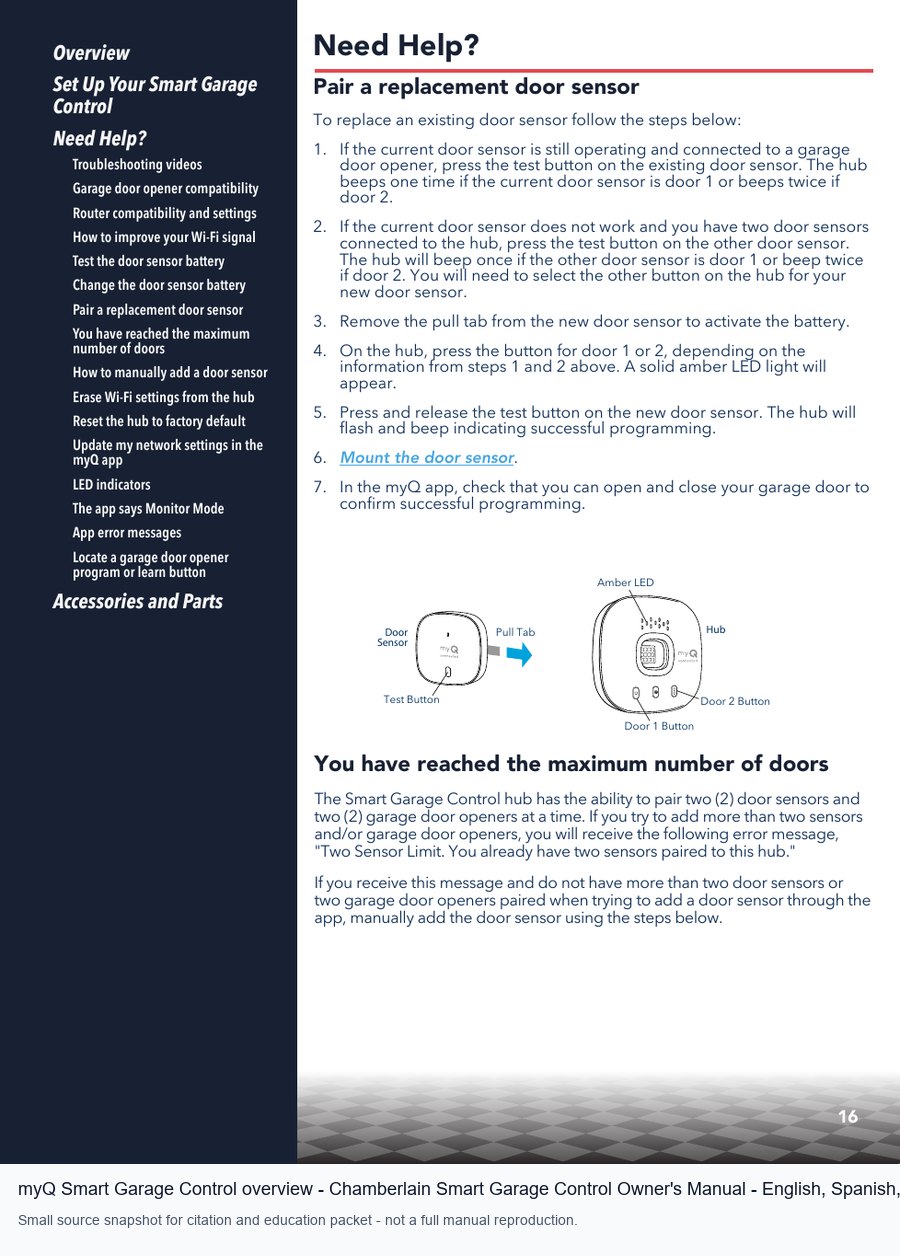
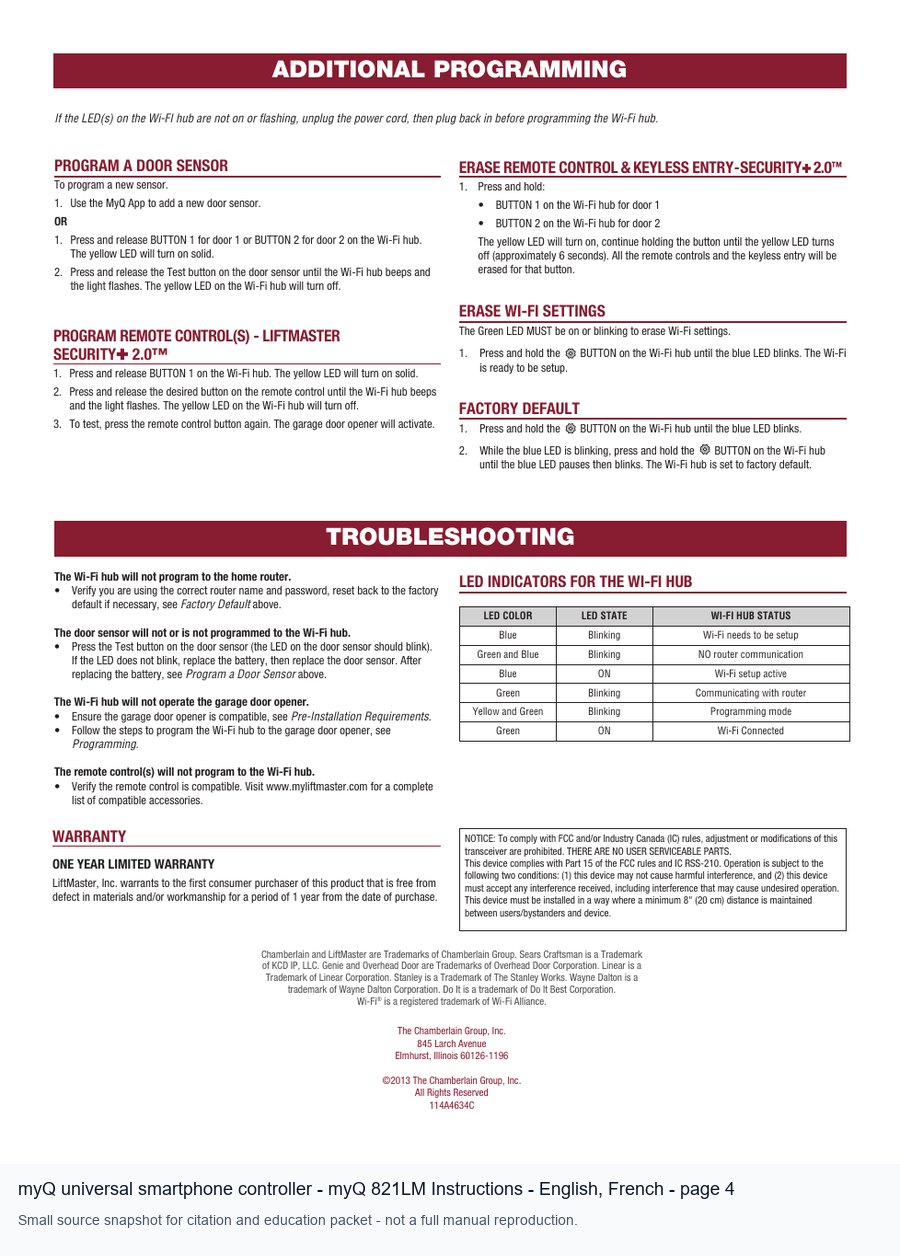
myQ problems are often blamed on the opener when the root is connectivity, account state, a hub/sensor pairing issue, or a power-cycle sequence. The useful first split is whether the wall control and opener still operate the door normally. If the door works from the wall station but not from the app, the likely evidence path is app connection, Wi-Fi coverage in the garage, Bluetooth setup, serial number, or accessory pairing. If the door does not operate from the wall station either, it is not just an app article; it is an opener or door-system diagnosis.
When repair becomes replacement planning
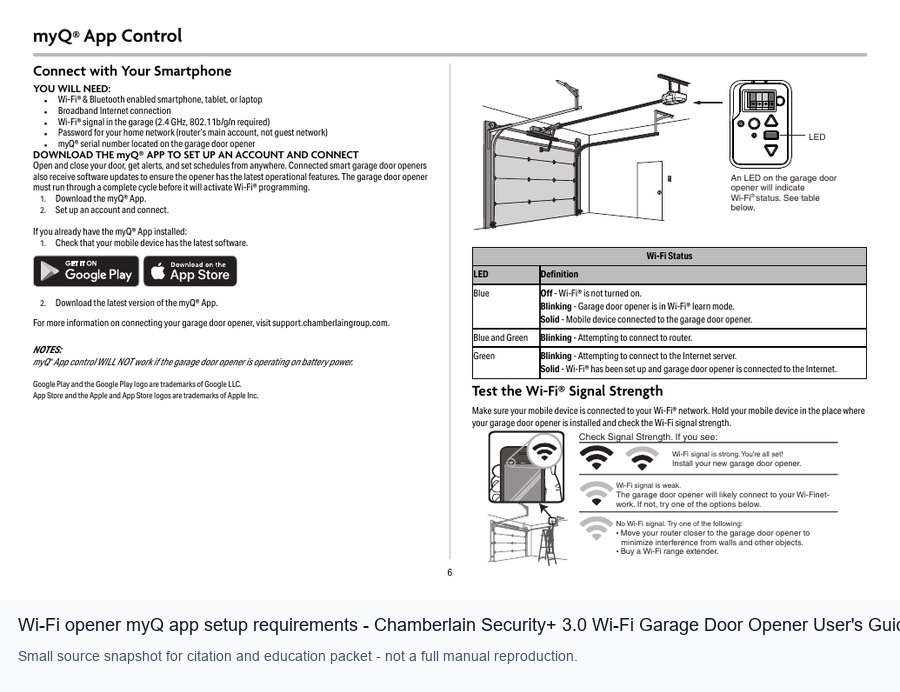
The official documents are helpful because they separate setup requirements from mechanical installation. Wi-Fi range, a 2.4 GHz network, a phone or tablet with the app, and the myQ serial number are setup-side items. Door balance, travel limits, sensors, and force behavior are mechanical/electrical-side items. A strong research-center article should teach that separation so homeowners do not erase memory or reset devices before writing down the symptom that a technician needs.
Internal links this page should receive
This also creates a good internal-link path on a garage door site. A myQ page can link to remote programming, safety sensor troubleshooting, battery backup after outage, and opener replacement. The reader gets a decision tree instead of a dead-end FAQ. The conversion path is natural: if the app issue turns out to be a safety sensor, travel, or power problem, the article sends the visitor to the repair request page with better notes.
When the door is stuck, stop forced operation and use the checklist to decide whether the next step is safe. Keep the exact model manual open while reading this guide. If the manual family does not match the opener or accessory in the garage, treat this page as education only and locate the correct document before ordering parts or attempting programming.
Manual Sources Used
- Official Chamberlain Group Manuals & Parts index: https://support.chamberlaingroup.com/s/manuals-parts#t=All
- Chamberlain Smart Garage Control Owner's Manual - English, Spanish, French - https://cgi.widen.net/view/pdf/ottqgh4crq/114-5737-000.pdf?t.download=true&u=odjzmi
- Chamberlain Security+ 3.0 Wi-Fi Garage Door Opener User's Guide - English, French - https://cgi.widen.net/view/pdf/keeb6ve9lx/114-6134-000.pdf?t.download=true&u=odjzmi
- Chamberlain Smart Garage Control Quick Start Guide - English, French, Spanish - https://cgi.widen.net/view/pdf/cr3xqxzg9m/114-5734-000.pdf?t.download=true&u=odjzmi
- myQ 821LM Instructions - English, French - https://cgi.widen.net/view/pdf/c58l0e0ixy/114a4634.pdf?t.download=true&u=odjzmi
Compliance Notes
- This is original explanatory content derived from official source manuals and small cited snapshots.
- It does not reproduce full manuals and does not claim affiliation, authorization, reviews, ratings, arrival guarantees, or certified-brand status.
- Before live deployment, import Semrush keyword-gap evidence for the target domain and map the final page title, internal links, and surrounding hub structure.
How to use this guide safely
This page is original homeowner education based on small cited snapshots from official manufacturer manuals. It does not replace the exact product manual, does not reproduce the full manual, and does not claim manufacturer affiliation or authorized dealer status.
Use it to gather model numbers, symptoms, light codes, remote/keypad details, and photos before requesting service. Springs, cables, brackets, door balance, and heavy-door adjustments are professional work.